
Embroidery Thread Libraries
InkSoft has pre-loaded thread libraries that are easily accessible with Embroidery in RPC.
Thread Libraries help standardize thread selections across your organization by providing a centralized collection of thread colors and specifications for use in production. By creating and managing thread libraries, you can improve consistency, simplify product setup, and ensure accurate thread assignments throughout the production process. This article explains how to create, manage, and maintain Thread Libraries within Production Manager.
Embroidery in RPC
Thread Libraries
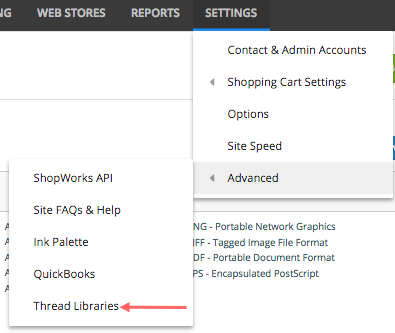
- Hover over Settings
- Hover over Advanced
- Click Thread Libraries
System Libraries
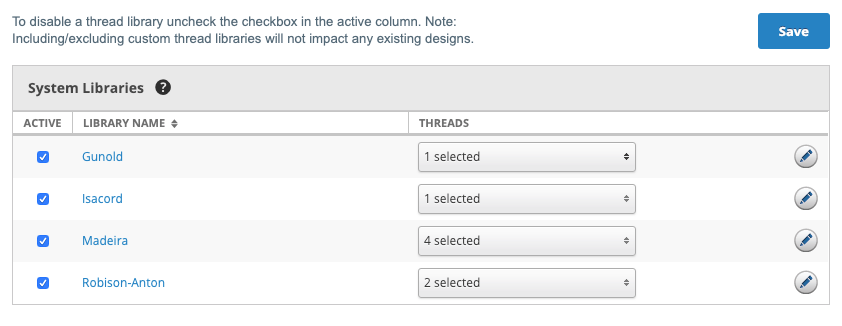
You will have 4 main libraries automatically set as Active.
- Gunold (Sulky)
- Isacord (Poly)
- Madeira (Classic Rayon, Poly, Rayon)
- Robison-Anton (Polyester, Rayon)
Edit Thread Libraries
- To disable a thread library as a whole; uncheck the checkbox within the active column
- To disable a thread catalog, click the drop-down under Thread and uncheck the thread you want to deactivate
- Click on the Library Name OR Edit Pencil to deactivate a specific thread color
- Click Save to maintain your edits
Note: Excluding custom thread libraries will not impact any existing designs.
Comments
0 comments
Article is closed for comments.